Print Apply: label applicator that prints and applies labels
Variable data printed on demand and applied in the right position
The Print Apply prints the label with variable data, such as batch, expiry date and barcode, and applies it to the product, box or pallet in a single process. It applies on the top, side or bottom, with barcode reader and integration with plant systems as options.
- Up to 30 m/min on pedestal and up to 40 m/min servo driven
- Top, side or bottom application
- 7" color HMI and electronic label sensor
- NR-12 and ABNT NBR 5410

What is Print Apply
Print Apply is a system that prints the label at the moment of application and applies it automatically to the product, box or pallet. It combines a label printer, usually thermal transfer, with an applicator. Each label carries the data of the batch in production, such as date, expiry, barcode and QR Code, with no stock of preprinted labels.
When to use Print Apply and when to use preprinted labels
- Print Apply: when the label changes with each batch, product or order, with variable data such as date, expiry, weight, barcode, QR Code and shipping labels for boxes and pallets.
- Preprinted labels: when the label is always the same, such as brand and product labels. In this case, a label applicator or an automatic labeler does the job at a lower cost.
- Frequent product changeover: the Print Apply with automatic adjustment sets the label position by reading the barcode, without stopping the line.
What changes on your line
The right label on the right product
The label is printed at the moment of application, with the data of the batch in production.
Less manual work
Printing and applying in the same cycle eliminates manual labeling and reduces cycle time.
Inline verification
Barcode reader and feedback system check the applied label.
Integration
Communication with ERP, WMS and printers, so data reaches the line with no manual entry.
Model comparison
| Pedestal Print Apply | Servo driven Print Apply | Linerless Print Apply | |
|---|---|---|---|
| Use | Boxes, products and pallets on the line | Application with servo motor transport | Linerless labels in flexible sizes |
| Speed | up to 30 m/min | up to 40 m/min | on request |
| Application variation | up to 5 mm | up to 5 mm | on request |
| Compressed air | 8 bar | 6 bar | no pneumatic drive |
| Roll width | 10 to 115 mm | 10 to 115 mm | flexible sizes |
| Ribbon | yes (thermal transfer) | yes (thermal transfer) | no ribbon |
| Dimensions (L x W x H) | 2,320 x 929 x 2,479 mm | 1,325 x 1,275 x 1,707 mm | on request |
All with 7″ color HMI, electronic label sensor and 220 V, 60 Hz power supply. Dimensions can be adapted to the process.
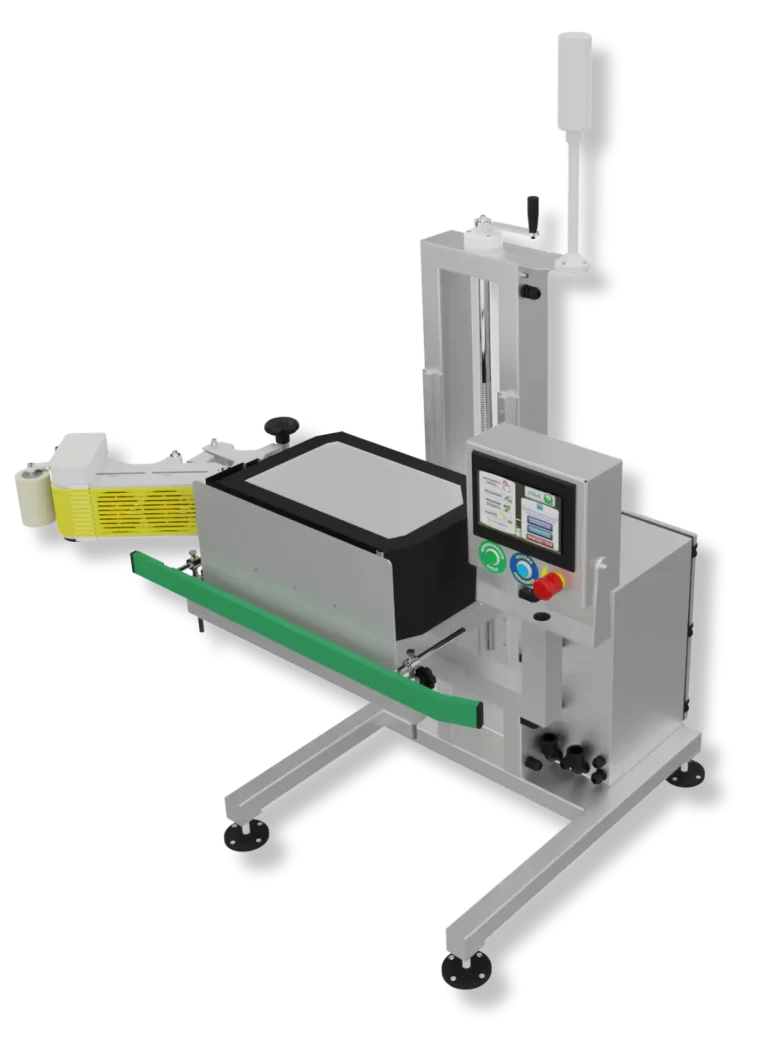
Pedestal Print Apply
Prints and applies
Prints and applies labels automatically in different positions, sizes and formats, defined together with the printer. Applies directly to the product, at the end of the line, on the side of the box or on the front of the pallet.
- Up to 30 m/min, with up to 5 mm variation
- Options: barcode reader, signal light, statistical software and feedback system
- Adaptable to the specifics of each process

Linerless Print Apply
No liner and no ribbon
Prints and applies linerless labels, without the backing paper that becomes waste with regular labels. The system guides the label and applies it to the product with no ribbon and no pneumatic drive, which reduces operating costs and standardizes application.
- No liner waste
- Labels in flexible sizes
- No ribbon and no compressed air
Printing, adjustment and integration
Printers
203 or 305 dpi print modules and Zebra, Sato, Videojet and Domino thermal transfer printers.
Automatic adjustment
In special projects, adjustment is made by reading the barcode or QR Code, with up to 10,000 product settings.
ERP and WMS
Label data can come straight from management systems, with production traceability.
Print Apply with automatic adjustment
In special projects, the Print Apply sets the application position on its own by reading the barcode or QR Code on the box, with up to 10,000 product settings, an easy to use HMI, accuracy of ±5 mm and up to 25 m/min. See it in operation:
Frequently asked questions
What is the difference between Print Apply and a label applicator?
The Print Apply prints the label at the moment of application, with variable data. The label applicator applies labels that are already printed.
Does the Print Apply label pallets?
Yes. The Print Apply applies labels to the product, the side or top of the box and the front of the pallet.
Does it need a ribbon?
Models with thermal transfer printers use ribbon. The Linerless does not use ribbon.
Does the Print Apply connect to ERP or WMS?
Yes. TECMAES integrates the Print Apply with management systems so label data reaches the line with no manual entry. See machine integration.
How fast is the Print Apply?
Up to 30 m/min on the pedestal model and up to 40 m/min on the servo driven model, with up to 5 mm application variation.
What label width does it accept?
Rolls from 10 to 115 mm wide on the pedestal and servo driven models. The Linerless works with labels in flexible sizes.
How do I request a quote?
Through the contact page. Tell us the product or box, label position, label size, the data you need to print and the line speed.
Talk to TECMAES engineering
Tell us where the label goes and what data it carries. TECMAES will recommend the right Print Apply for your line.